Drill diagram maker for football coaches
Put players, cones and goals on the pitch, draw the passes, runs and shots, then animate the movement frame by frame. It works on a laptop, tablet or phone, and there's nothing to install.
Drawing is free. You only need an account to save.
How do I draw and animate a football drill diagram?
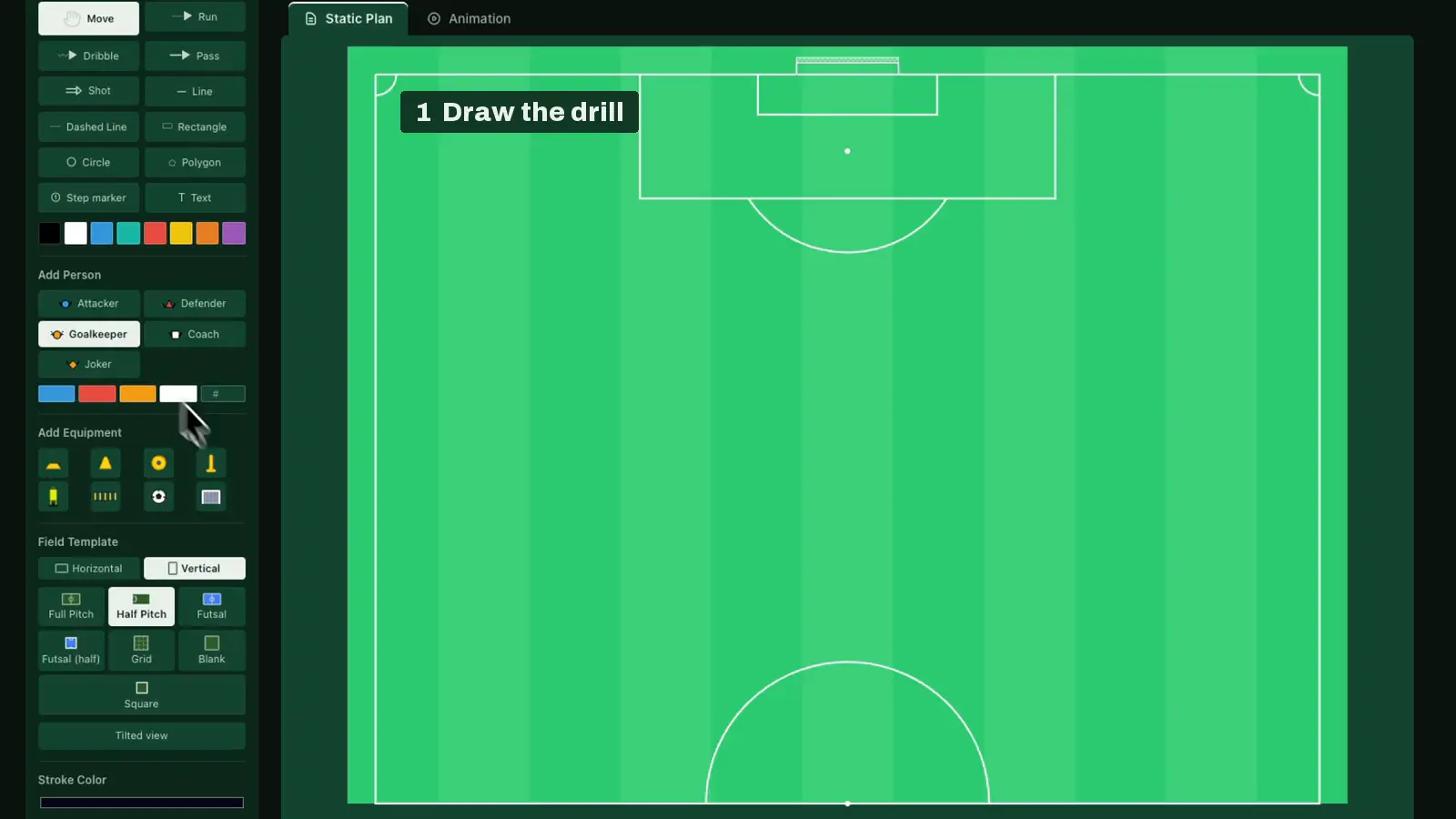
Open the board and pick a pitch template: a full pitch, a half pitch, a grid or futsal. Drag players, cones, balls and goals onto it, then draw the movement, with a separate arrow for passes, runs, dribbles and shots. Lines, shapes and text mark out the areas and the coaching points. That's your drill diagram. You can save it to your account, download it as an image or send it to the team's group chat. To animate it, switch the board to animation and move the players one frame at a time, then press play to watch the drill run the way it will on the pitch. Animation is part of Premium, and so is saving the animation as a GIF or an MP4 video. If you'd rather not start from an empty pitch, open one of the hundred-plus drills in the library and change whatever doesn't fit your group.
Drawing and animating a drill
Pick a pitch, add players and gear, and draw the passes and runs. Name the drill and save it. On the "Animation" tab, delete the arrows, duplicate the frame with the + button and move the players. Animation comes with Premium.
From an empty pitch to an animated drill
Draw a drill
Players, cones, balls and goals on the pitch, with separate arrows for passes, runs, dribbles and shots. Pitch templates include a full pitch, a half pitch, a grid and futsal.
Animate the movement
Move the players one frame at a time and press play. Animation is part of Premium.
Build a session
Warm-up, main part and a small-sided game in one session, each with its duration. You can take the session to the pitch as a PDF.
Build a session in the session planner
Take it to the pitch and share it
Open the session on your phone at training, or send a drill as an image to the team's group chat. In a club, the other coaches see the same session with their own logins.
Magnetic board or a drill diagram in the browser?
A magnetic board is quickest at half-time in the dressing room, with no battery and no login, but the setup's gone once you wipe it. In the browser the drill stays saved, the movement plays as an animation, and you can export a drill as an image, PDF, GIF or MP4 video. Plenty of coaches use both.
Ready-made drills
The library has over a hundred drills published by coaches: rondos, passing drills, small-sided games and plenty more. Open one on the board and change whatever doesn't fit your session.
How it compares to other drill and session tools
We compared nine planning tools: Sport Session Planner, SoccerDrive, Football Planner, CoachTools, The Tactics App, RenderFoot, CoachTruly, Clubroom.io and TacticsBoard. Read the tools comparison
Jürgen and AI-built sessions
Jürgen, the AI assistant coach, answers coaching questions, helps with the app and suggests drills from the library, in your own language. For now it runs on desktop browsers only.
The AI session builder takes a topic, player count, age group and length, and picks matching drills from the library with a duration for each. It doesn't draw new drills. Both need you to sign in, but a free account is enough.
Frequently asked questions
Is drawing drills free?
Drawing and PNG export are free, and a free account keeps five drills in the cloud. Premium (€4.99/month) adds animation plus PDF, GIF and MP4 export, and removes the limit.
Do I need to install anything?
No. The board runs in the browser on phones, tablets and computers. You can add it to your home screen if you want it to behave like an app.
Can I animate players and the ball?
Yes, with Premium. You place keyframes on a timeline and the board plays the movement back. You can also save the animation as a GIF or an MP4 video.
Are there ready-made drills?
The library has over a hundred public drills from other coaches. Open any of them on the board and edit it for your own use.
Does it work for other sports?
It's built for football: the pitch templates and markings are football specific. That's also why drawing is fast. The tool doesn't try to bend to every sport.
Pricing
Free €0, Premium €4.99/month, club plans from €14.99/month.
Drills by category
Football & soccer passing drills · Football & soccer first touch drills · Football & soccer finishing drills · Football & soccer defending drills · Football & soccer possession drills · Football & soccer attacking drills · Football & soccer dribbling drills · Football & soccer shooting drills · Football & soccer 1 vs 1 drills · Football & soccer small-sided games · Football & soccer transition drills · Football & soccer drills for kids · U10 football & soccer drills and sessions · Futsal drills
Open the board — TacticsBoard · Browse the drill library · Practice plan template · Pricing